Blitch Modern Blackletter Font for Web Design
I was working late one evening, tweaking the hero section of a boutique online store, when I stumbled upon Blitch. The moment I applied it to the headline, something clicked—this font had that unmistakable edge, like ink spilled on parchment, yet with a modern twist. It wasn’t just a typeface; it was a mood. As a web designer, I know how crucial typography is to brand identity and user experience, and Blitch brought exactly that kind of character to the table.
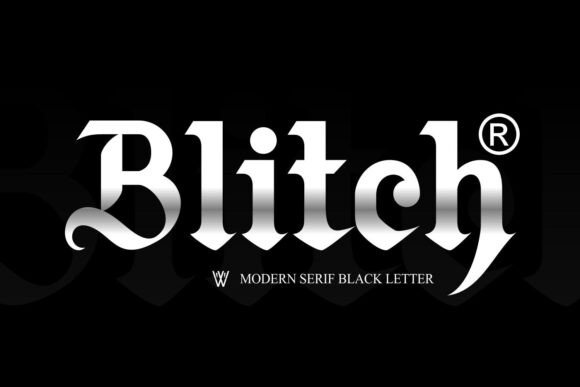
Blitch Modern Blackletter Font is a premium display font with a tattoo-inspired aesthetic. Its bold serifs and intricate details give it a handcrafted feel, perfect for websites that want to stand out without sacrificing elegance. This Blackletter font has a visual personality that’s both edgy and refined, making it ideal for creative portfolios, boutique stores, or any site that needs a touch of authenticity and flair.
Blitch in Action: A Hero Section Makeover
Let’s say you’re designing a landing page for a new line of handmade jewelry. You need a headline that grabs attention but also feels personal. Blitch fits perfectly here. When I tested it on a hero section, the contrast between the dark, textured letterforms and the soft background image created a powerful focal point. It didn’t just look good—it felt intentional, like the brand itself had a story to tell.
On mobile screens, where space is limited, Blitch still performed well. The letters remained legible even at smaller sizes, though I did adjust the leading slightly to prevent overcrowding. For fast-loading pages, I made sure to use the webfont version, which loaded quickly without compromising quality.
Designing with Blitch: Where It Shines Online
Blitch works best as a display font rather than for long-form text. In my test case, I used it for section headings, call-to-action buttons, and logo text. It added visual interest without overwhelming the layout. For example, using Blitch on a “Shop Now” button gave it an artisanal feel that matched the brand’s handmade ethos.
When paired with a clean sans serif font like Helvetica Neue or Lato for body copy, Blitch balanced out the design beautifully. The contrast between the decorative display font and the simple body text created a clear visual hierarchy, making the content easier to scan and read.
Another great use was for blog headers. I applied Blitch to a post titled “The Art of Handmade Jewelry,” and it immediately caught the eye. The font’s texture complemented the imagery, creating a cohesive and engaging reading experience.
Readability Tips for Web Projects
While Blitch is visually striking, it’s important to consider readability in different contexts. On dark backgrounds, I found that adding a subtle white or light gray stroke helped the letters pop more clearly. For small buttons or navigation elements, I avoided using Blitch due to its complexity, sticking instead to simpler fonts that are easier to read at tiny sizes.
For image overlays, Blitch worked wonders. Placing it over a high-quality photo of a product gave the text a sense of depth and dimension, enhancing the overall aesthetic. However, I always made sure there was enough contrast between the text and the image to avoid issues with legibility.
One thing to keep in mind is that Blitch isn’t suitable for long paragraphs or dense blocks of text. Its decorative nature can make it hard to read in large quantities. That said, it’s perfect for headlines, subheadings, and short phrases that need to make an impression.
Choosing the Right Font Pairings
Font pairing is essential for maintaining a cohesive design. Blitch pairs exceptionally well with minimalist sans serif fonts, which provide a nice counterbalance to its ornate style. If your brand leans more towards editorial design, consider pairing it with a classic serif font like Georgia or Times New Roman for a more traditional feel.
For digital branding kits, Blitch can be a standout choice for logos, taglines, and promotional banners. Just ensure that the font licensing allows commercial use, especially if you're planning to use it across multiple platforms or client projects.
Before finalizing any design, I always check the font’s included styles, alternates, and weights. Blitch offers several variations that can be used creatively depending on the context. Also, verifying multilingual support is key if your website targets a global audience.
In the end, Blitch Modern Blackletter Font proved to be a versatile and stylish addition to my web design toolkit. Whether it was used on a boutique store, a coaching website, or a portfolio homepage, it consistently elevated the visual appeal and brand identity of the project. If you're looking for a font that brings character and charm to your digital designs, Blitch is definitely worth exploring.